Diagram-Driven
Microservices Generator with AI
AI-Powered Enterprise Microservices
Safely Regeneratable and Maintainable
Production-Ready, Cloud-Native
Not one-off AI-generated code
Not just templates
Built for iteration and safe regeneration
Generate Microservices with AI
QuickCode Studio
Generate Microservices with AI
QuickCode Studio
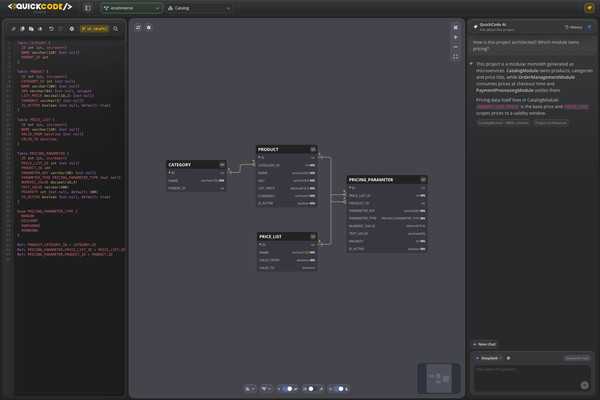
Transform your database designs into production-ready microservices with QuickCode, an AI-powered, cutting-edge, diagram-driven generator that empowers developers. Generate fully functional, production-ready services from your DBML diagrams using QuickCode DSL—a simple, intent-based language for defining custom queries and commands (updates, deletes) with automated endpoints, handlers, and optimized SQL using Dapper. Our AI-powered DBML generation accelerates module design, enabling you to create comprehensive database schemas faster than ever. Streamline your workflow and focus on building features instead of boilerplate.
Deploy directly to Google Cloud Run with automated GitHub Actions pipelines. Generated services are deployed to Cloud Run with zero manual configuration. Each project creates isolated GitHub Actions pipelines, ensuring complete separation and security. QuickCode transforms your diagrams into production-ready microservices.
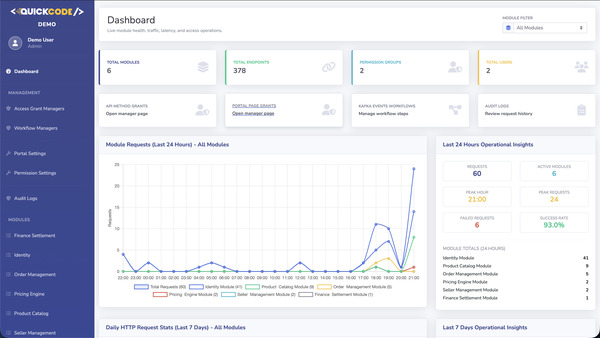
Forget building admin panels or workflow engines from scratch. QuickCode's admin portal handles group-based authorization for screens and endpoints, table-level permissions, and configurable endpoint workflows—from sending emails to triggering custom actions—all without writing a single line of code.
AI-Enhanced Development: Speed up your module design process with our AI-powered DBML generation. Describe your requirements, and let QuickCode's intelligent system generate optimized database schemas for your modules, dramatically reducing development time and ensuring best practices.
Cloud-Native Deployment: Generated services are deployed to Cloud Run with automated GitHub Actions pipelines. Each project creates isolated GitHub Actions pipelines, ensuring complete separation and security. Built with multi-tenant architecture from the ground up, QuickCode provides enterprise-grade isolation and scalability.
Generate Microservice with AI
Describe your complete microservice system in natural language, and our AI will automatically decompose it into multiple modules with optimized DBML schemas. Each module will have its own database, designed for scalability and microservice architecture best practices.
....
....
Describe your microservice system
Generate Microservices with AI

WHAT IS QUICKCODE?

Design, Visualize, Code, Deploy:
AI-Powered Enterprise Microservices

QuickCode is an innovative, AI-powered web-based platform designed to revolutionize microservice development for modern web applications. Leveraging the power of Database Markup Language (DBML) diagrams, our advanced AI capabilities enable you to generate DBML schemas for modules faster and more efficiently than traditional methods. This user-friendly tool empowers developers to effortlessly configure, deploy, and manage microservices with a focus on simplicity and efficiency.
Built on .NET 10 and powered by Entity Framework Core, QuickCode seamlessly integrates with Microsoft SQL Server, PostgreSQL, and MySQL databases using DBML schemas. Embracing the CQRS pattern, YARP serves as our API gateway for efficient request management. QuickCode's predefined modules and DSL (Domain-Specific Language) queries enable agile development, while an intuitive Admin Portal simplifies record and microservice management. With microservices orchestrated for scalability and GitHub Actions for continuous integration, applications are effortlessly deployed on Google Cloud Run. Generated services are deployed to Cloud Run with automated GitHub Actions pipelines. Each project creates isolated GitHub Actions pipelines, ensuring complete separation and security. Built with multi-tenant architecture, QuickCode provides enterprise-grade isolation where each project operates independently with its own database, services, and resources. Elasticsearch and Kibana integration provide centralized logging for effective monitoring. This powerful combination of cutting-edge technologies delivers a robust, scalable, and production-ready microservice experience.

Quickcode: Microservices Architecture

1
AI-Powered DBML Generation
QuickCode is a Diagram-Driven Microservices Generator with AI. Accelerate your module design process with our AI-powered DBML generation powered by leading AI models including Google Gemini, OpenAI, and Anthropic Claude. Simply describe your requirements in natural language, and QuickCode's intelligent system generates optimized database schemas for your modules, dramatically reducing development time while ensuring industry best practices. Not boilerplate code, not just templates—QuickCode transforms your diagrams into production-ready, maintainable microservices.
Google Gemini
OpenAI
Anthropic Claude
DBML Schemas with AI Assistance
Create your DBML schemas based on project requirements using our integrated DBML editor with AI assistance. These schemas include tables, relationships, and database structures. Our advanced AI capabilities, powered by Google Gemini, OpenAI, and Anthropic Claude, enable you to generate DBML schemas for modules faster and more efficiently than traditional manual methods.
QuickCode Modules or Custom Modules
Utilize QuickCode predefined modules or create custom modules to define fundamental models for your project. QuickCode modules enable agile development with pre-built functionality, while custom modules allow you to tailor the solution to your specific business needs. AI assistance helps you design optimal module structures.
QuickCode DSL - Define Custom Operations in DBML Notes
Enhance your DBML schemas with QuickCode DSL, a simple, intent-based language used within DBML Notes to define custom queries, updates, and delete operations. While AI generates your database schemas, you can add QuickCode DSL statements directly in table Notes to define custom backend operations. The system automatically generates REST API endpoints, handlers, and optimized SQL using Dapper for maximum performance. QuickCode DSL enables you to go beyond basic CRUD operations and define complex business logic directly in your DBML diagrams, making your schemas not just data models but complete API specifications.
2
Why QuickCode is Different
Copilot and ChatGPT help you write code. QuickCode helps you run engineering at scale. While generic AI generates one-off code snippets, QuickCode enforces a repeatable, regeneratable standard across all services—so upgrades, schema changes, and team growth don't create chaos.
Regen-Safe Generation
Regenerate services after schema changes without breaking your custom code. QuickCode separates generated code from your code using .g.cs files and partial classes, so your custom endpoints and business logic stay intact across regenerations.
Consistent Architecture
Every service follows the same patterns—logging, validation, error handling, authentication, and CI/CD. No more inconsistent implementations across teams or projects. Standards are enforced automatically, not manually.
Real APIs, Not Mock Swagger
Frontend and mobile teams get working endpoints with real data from day one. Stop handing your teams empty Swagger specs—generate working APIs that return actual data so integration can begin immediately.
Early Schema Validation
Catch wrong tables, columns, and types at generation time—not in QA or production. QuickCode validates your schema before generating code, preventing costly errors downstream.
3
Built for Iteration
QuickCode separates generated code from your code using .g.cs files and partial classes. You add custom endpoints and business logic in safe extension points. When you regenerate after adding new tables, columns, or updating your schema, QuickCode updates the generated layer while your custom layer stays intact.
Generated Layer
Controllers, DTOs, repositories, and scaffolding are generated in .g.cs files. These files are regenerated each time you update your schema, ensuring they always reflect your current database structure.
Custom Layer
Your business logic lives in partial classes and extension points. Add custom endpoints, validation rules, and domain logic in files that QuickCode never touches during regeneration.
Safe Regeneration
Schema diff updates EF Core mappings and migrations, then refreshes APIs consistently. Your custom code is preserved, so you can iterate on your schema without fear of losing work.
4
Fast POC Without Fake Contracts
Stop handing your frontend team empty Swagger specs. Generate working APIs that return real data so frontend and mobile teams can integrate on day one. QuickCode creates functional endpoints immediately, eliminating the back-and-forth of mocked responses and placeholder contracts.
Working Endpoints from Day One
Generated APIs are immediately functional with real database operations. No more waiting for backend to 'finish' before frontend can start integration.
Real Data, Real Responses
APIs return actual data structures and responses, not mocked placeholders. Frontend teams can build against real behavior, catching integration issues early.
5
Database Types
QuickCode supports multiple database systems, enabling you to choose the best database solution for your project. Whether you prefer MS SQL Server, PostgreSQL, or MySQL, QuickCode seamlessly integrates with your chosen database system.
SQL Server
Postgre SQL
MySQL
6
Development Tools
Generate your project effortlessly with the latest development tools and start using it immediately. QuickCode is built on .NET 10, the latest version of Microsoft's powerful framework. Every generated microservice is fully dockerized with Dockerfiles for each module, gateway, and portal, enabling you to run the entire stack with a simple docker-compose command.
.NET 10
Docker
Dockerized Microservices
Every generated microservice is fully dockerized with separate Dockerfiles for each module, gateway, and portal. Simply run docker-compose up to start your entire microservices stack. This ensures consistent environments across development, testing, and production, eliminating the 'it works on my machine' problem.
7
Serverless Infrastructure
Run your projects on Google Cloud's serverless infrastructure with automatic scaling to handle HTTP requests or events. Deploy directly to Google Cloud Run with automated GitHub Actions pipelines, transforming your diagrams into production-ready microservices with zero manual configuration.
QuickCode Generator
GitHub
Cloud Run
8
API and Service Creation
Generate fully functional, production-ready services from your DBML diagrams using QuickCode DSL—a simple, intent-based language for defining custom queries and commands. QuickCode automatically creates endpoints, handlers, and optimized SQL using Dapper for maximum performance.
Coding Language - .NET 10
Implement APIs supporting CRUD operations based on DBML schemas or modules using .NET 10. This ensures access to the latest features and improvements in the .NET ecosystem, providing high performance and modern development capabilities.
Entity Framework Integration
Incorporate Entity Framework for seamless database operations, making it easy to interact with MS SQL Server, PostgreSQL, or MySQL databases. Entity Framework provides powerful ORM capabilities, enabling efficient data access and management across different database systems.
CRUD Operations and CQRS Pattern
Implement APIs supporting CRUD operations based on DBML schemas or modules. Incorporate the CQRS (Command Query Responsibility Segregation) pattern to separate read and write responsibilities, enhancing system scalability and maintainability. QuickCode automatically generates default CRUD endpoints for every table.
QuickCode DSL - Custom Queries and Commands
Develop specific queries and commands according to QuickCode DSL patterns for custom operations defined by your project. QuickCode DSL is a simple, intent-based language used within DBML Notes to define custom backend operations. The system automatically generates endpoints, handlers, and optimized SQL using Dapper for maximum performance. QuickCode DSL enables agile development with intuitive query patterns that make it easy to define complex business logic.
Postman Collections
QuickCode automatically generates ready-to-use Postman collections for all modules. These collections include all endpoints (CRUD and custom endpoints from Query Notes), automatic login endpoint with token management, and pre-configured environment variables for different environments (local, docker, test, prod, cloudrun). Import the collections and start testing your APIs immediately without any manual configuration.
9
Creation of Admin Portal
Forget building admin panels or workflow engines from scratch. QuickCode's admin portal handles group-based authorization for screens and endpoints, table-level permissions, and configurable endpoint workflows—from sending emails to triggering custom actions—all without writing a single line of code.
Table Management
Utilize the Admin Portal generated from your DBML schemas to manage records in specified tables. The intuitive Admin Portal simplifies record management and microservice administration, providing a user-friendly interface for all your data operations.
Authorization and Authentication
Implement user-based authorization and authentication processes for the Admin Portal. QuickCode's admin portal handles group-based authorization for screens and endpoints, along with table-level permissions, ensuring secure access control for your microservices.
Configurable Workflows
Configure endpoint workflows from sending emails to triggering custom actions—all without writing a single line of code. The admin portal provides powerful workflow capabilities that can be configured through the intuitive interface, eliminating the need for manual coding.
10
Management Pages
QuickCode's admin portal includes specialized management pages for fine-grained control over access permissions and event-driven workflows. These pages provide centralized interfaces for managing API method access, portal page permissions, and Kafka event configurations across all your microservices.
API Method Access Grants
Manage fine-grained access control for API endpoints through the API Method Access Grants page. Define which permission groups can access specific API methods across all modules. This enables you to control access at the endpoint level, ensuring that only authorized users and groups can call specific API methods. The system automatically tracks all API method definitions and provides an intuitive interface to grant or revoke access permissions.
Portal Page Access Grants
Control access to portal pages and actions through the Portal Page Access Grants page. Define which permission groups can access specific portal pages and perform specific actions (List, Detail, Create, Update, Delete). This granular permission system ensures that users only see and interact with pages they are authorized to access. Manage page-level permissions for all modules from a centralized interface.
Kafka Events Management
Configure and monitor Kafka events through the Kafka Events Management page. Define event-driven workflows and manage event handlers for your microservices. This page allows you to view all Kafka events, configure event listeners, and set up event-driven workflows that trigger actions when specific events occur. Integrate event-driven architecture patterns seamlessly into your microservice ecosystem.
11
Microservices Architecture
Built on .NET 10 and powered by Entity Framework, QuickCode seamlessly interacts with MS SQL Server, PostgreSQL, or MySQL databases using DBML schemas. Embracing the CQRS pattern, YARP serves as the gateway for efficient API management and request routing.
Gateway with YARP
Utilize YARP (Yet Another Reverse Proxy) as a gateway to manage and route requests between microservices. A gateway plays a crucial role in handling API requests, providing security, and simplifying the client experience. YARP enables efficient API management and seamless communication between services.
Communication Between Microservices
Define communication mechanisms, considering API calls or message queues for interactions between microservices. QuickCode enables flexible communication patterns, allowing you to choose the best approach for your specific use case and ensuring reliable service-to-service communication.
Orchestration and Management
Employ suitable tools and services for orchestrating and managing microservices. With microservices orchestrated for scalability, QuickCode ensures your application can handle growing demands while maintaining high performance and reliability.
12
Integration with GitHub
All generated code is automatically pushed to a GitHub repository. Leverage GitHub Actions for continuous integration and deployment, defining workflows to automate testing, build processes, and deployment tasks.
GitHub Repository
All generated code is automatically pushed to a GitHub repository. QuickCode automatically creates and manages your GitHub repository, ensuring version control and collaboration capabilities for your microservice project.
GitHub Actions
Leverage GitHub Actions for continuous integration and deployment. Define workflows to automate testing, build processes, and deployment tasks. Deploy directly to Google Cloud Run with automated GitHub Actions pipelines, transforming your diagrams into production-ready microservices with zero manual configuration.
Automated Testing
QuickCode automatically generates comprehensive test suites for your microservices. This includes repository tests, CRUD operation tests, and integration tests. The test framework is pre-configured and ready to run, ensuring code quality and reliability from the start. Run tests with a simple command and get immediate feedback on your code's correctness.
13
Deployment to Google Cloud Run
Deploy directly to Google Cloud Run with automated GitHub Actions pipelines. QuickCode transforms your diagrams into production-ready microservices with zero manual configuration, enabling serverless deployment with automatic scaling capabilities.
Automated Deployment
Use GitHub Actions to deploy the application to Google Cloud Run. This ensures a streamlined and automated deployment process. Run your projects on Google Cloud's serverless infrastructure with automatic scaling to handle HTTP requests or events with minimal configuration.
Serverless Infrastructure
Leverage Google Cloud Run's serverless infrastructure for automatic scaling and efficient resource management. Your microservices automatically scale based on demand, ensuring optimal performance and cost-effectiveness without manual intervention.
14
Logging with Elasticsearch and Kibana
Integrate Elasticsearch and Kibana for centralized logging. This enables effective monitoring and analysis of logs generated by microservices, providing comprehensive insights into your application's performance and behavior.
Elasticsearch and Kibana Integration
Integrate Elasticsearch and Kibana for centralized logging. This enables effective monitoring and analysis of logs generated by microservices. Elasticsearch and Kibana integration provides centralized logging for effective monitoring, delivering a robust and responsive QuickCode-driven microservice experience.
Centralized Logging and Monitoring
Monitor and analyze logs from all microservices in a centralized location. Elasticsearch provides powerful search and indexing capabilities, while Kibana offers intuitive visualization tools, enabling you to quickly identify issues and optimize your microservice architecture.
15
FAQ: QuickCode vs AI Codegen
Common questions from CTOs and engineering leads evaluating QuickCode alongside AI coding assistants like Copilot and ChatGPT.
We already use AI to generate backend code. Why do we need this?
Generic AI generates one-off code. QuickCode enforces a repeatable, regeneratable standard across all services—so upgrades, schema changes, and team growth don't create chaos. You get consistency, not just code.
What happens when we add or change a table or column?
QuickCode detects schema changes, updates the generated layer (EF Core + API scaffolding), and preserves your custom code. You regenerate with confidence, not fear.
Will regeneration overwrite our custom code?
No. Generated code is isolated in .g.cs files. You extend via partial classes and safe extension points. Your custom endpoints and business logic are never touched during regeneration.
What about vendor lock-in?
You own the generated code—it's standard .NET. The value is speed, consistency, and safe regeneration, not a runtime dependency. If you stop using QuickCode, your code keeps working.
16
QuickCode vs AI Codegen: Comparison
A side-by-side comparison of QuickCode's schema-driven generation versus generic AI coding assistants. QuickCode is built for teams that need repeatability and safe iteration, not just code suggestions.
Consistency Across Services
QuickCode: Yes—every service follows identical patterns for logging, validation, auth, and error handling. Copilot/ChatGPT: Not guaranteed—each generation may differ based on prompt and context.
Safe Regeneration
QuickCode: Yes—regenerate after schema changes without losing custom code. Copilot/ChatGPT: No—regenerating overwrites previous output; manual merge required.
Real Working APIs
QuickCode: Yes—functional endpoints with database operations from day one. Copilot/ChatGPT: Depends—may generate incomplete or mock implementations.
Custom Code Isolation
QuickCode: Yes—.g.cs files + partial classes separate generated from custom code. Copilot/ChatGPT: No—no built-in separation; manual organization required.
CI/CD Scaffolding
QuickCode: Yes—GitHub Actions, Docker, Cloud Run deployment included. Copilot/ChatGPT: Manual—requires separate setup and configuration.

Demo Project Details

Scroll to load demo project content...